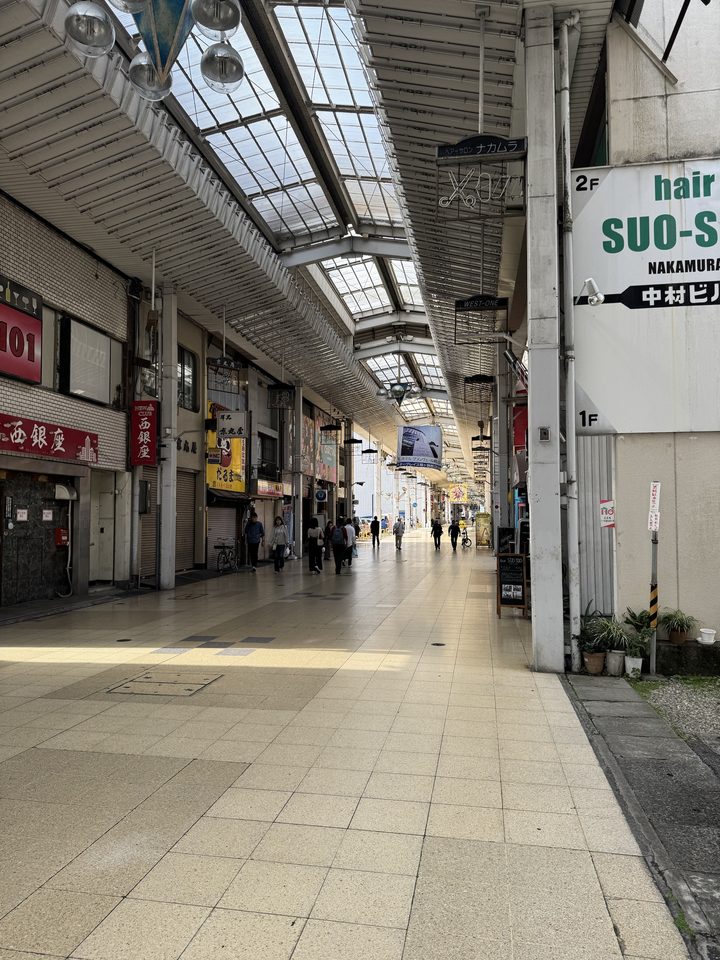
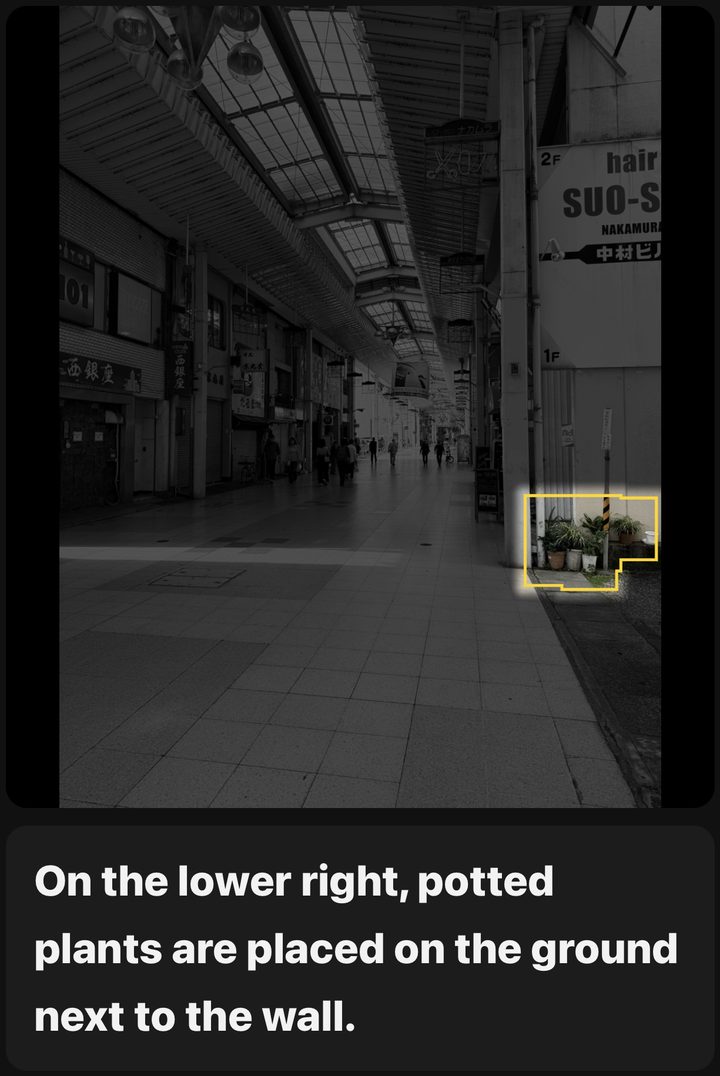
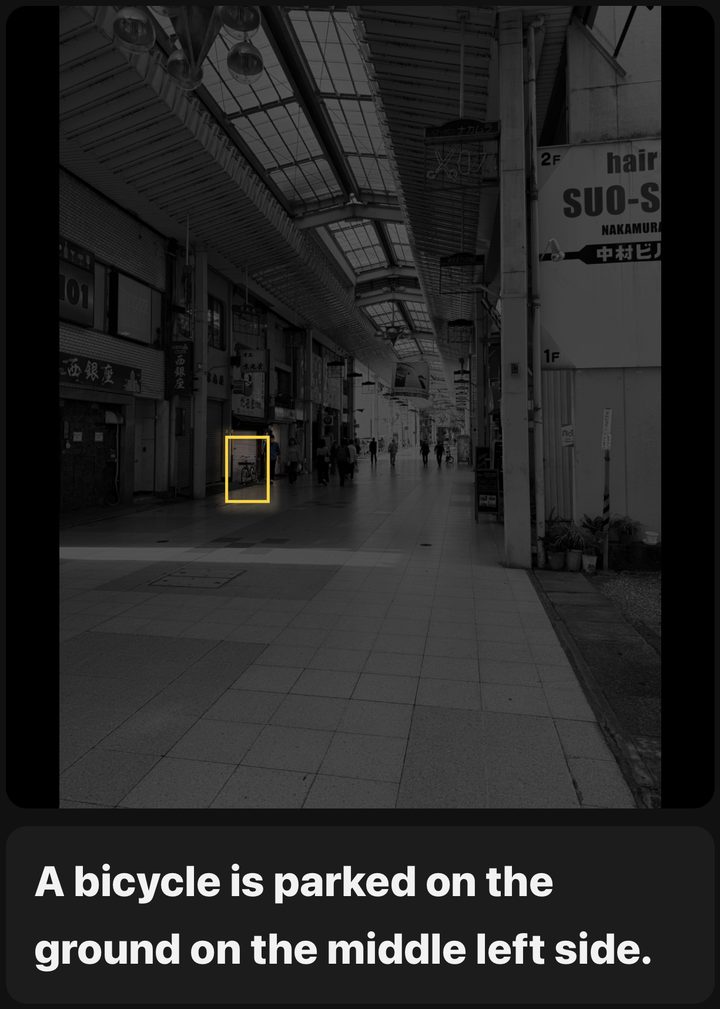
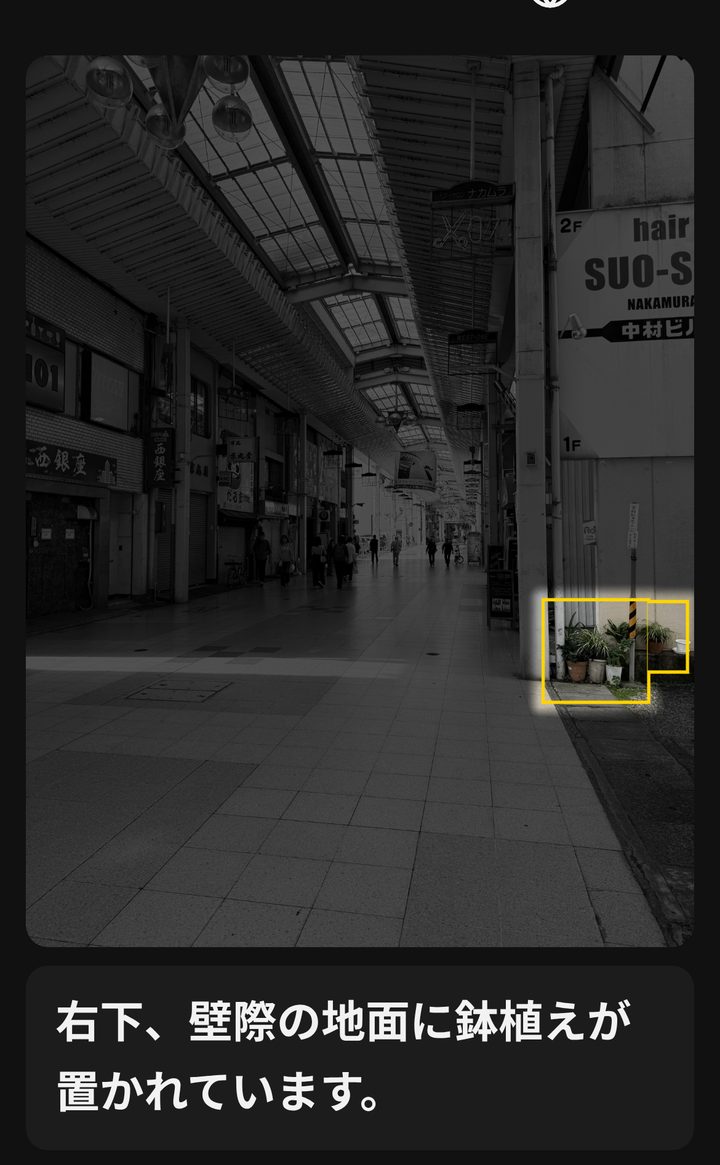
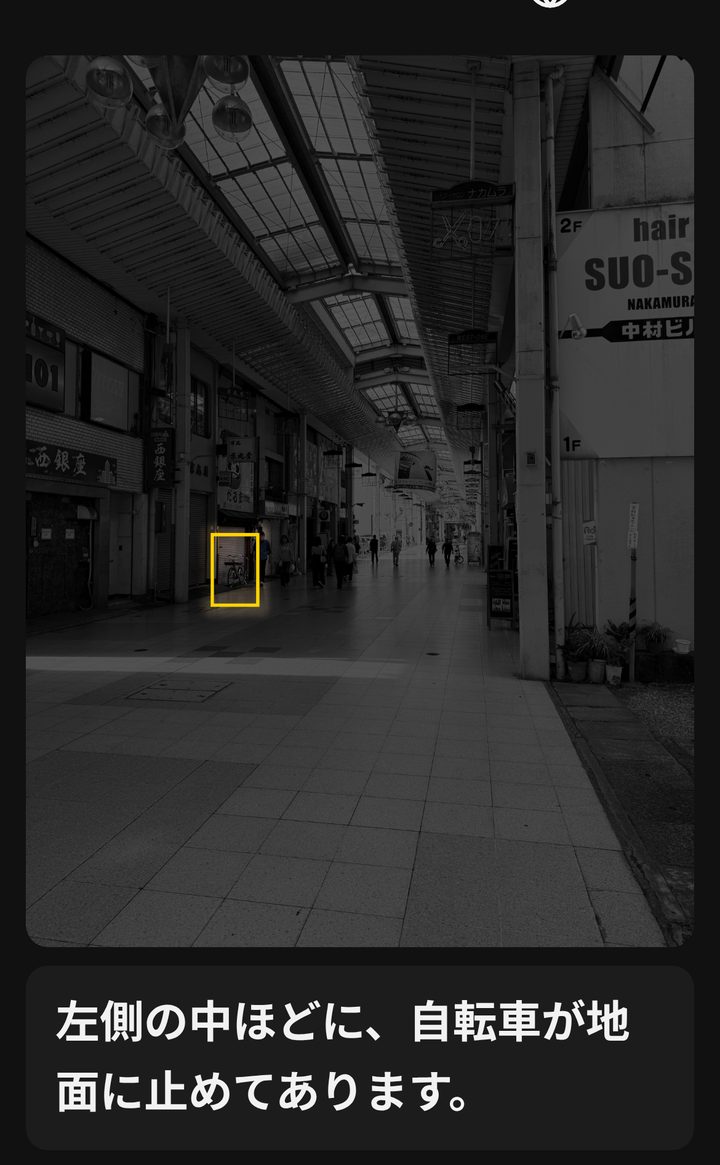
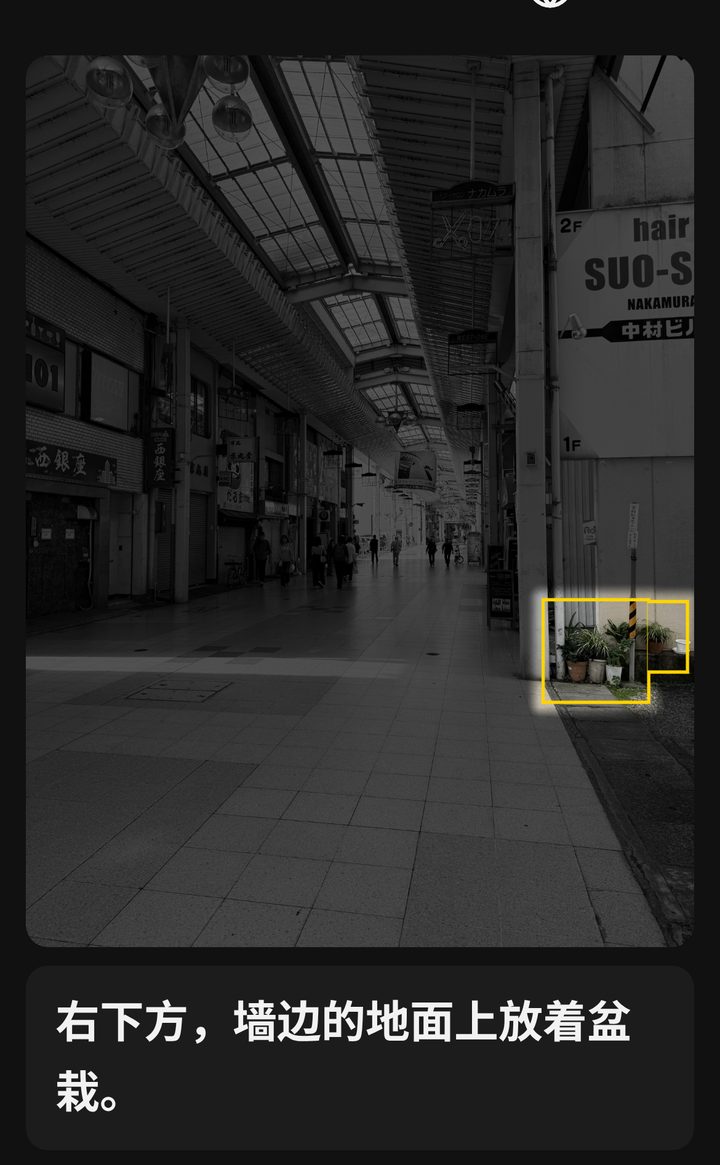
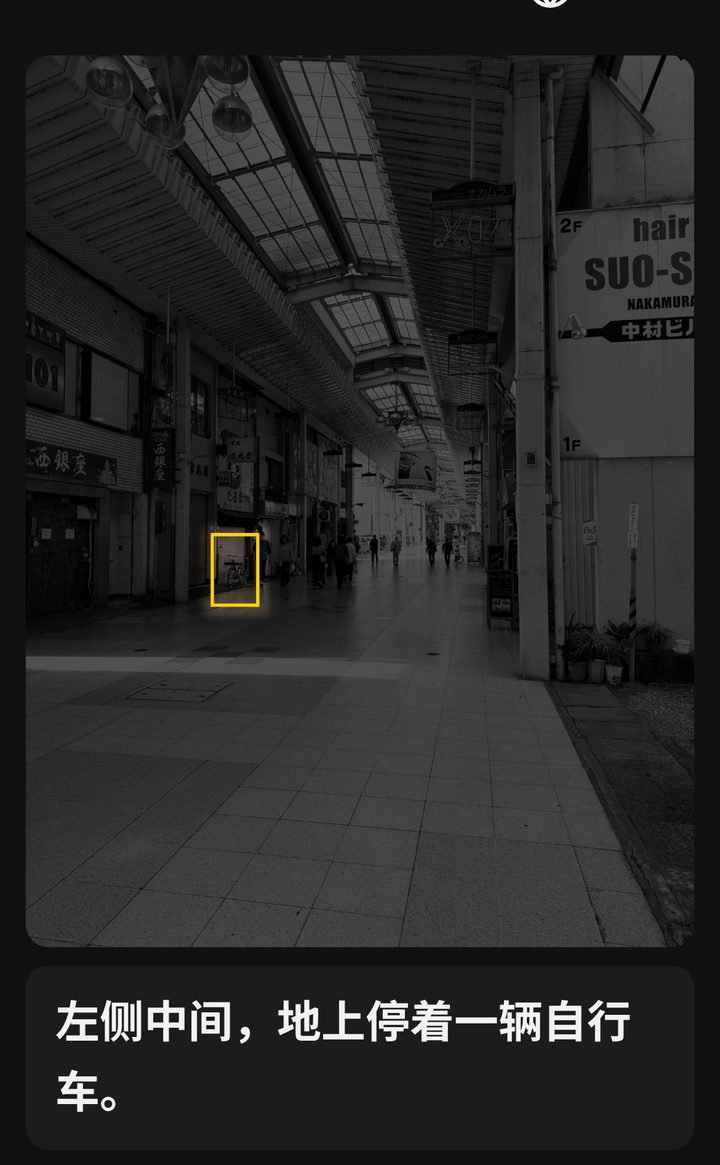
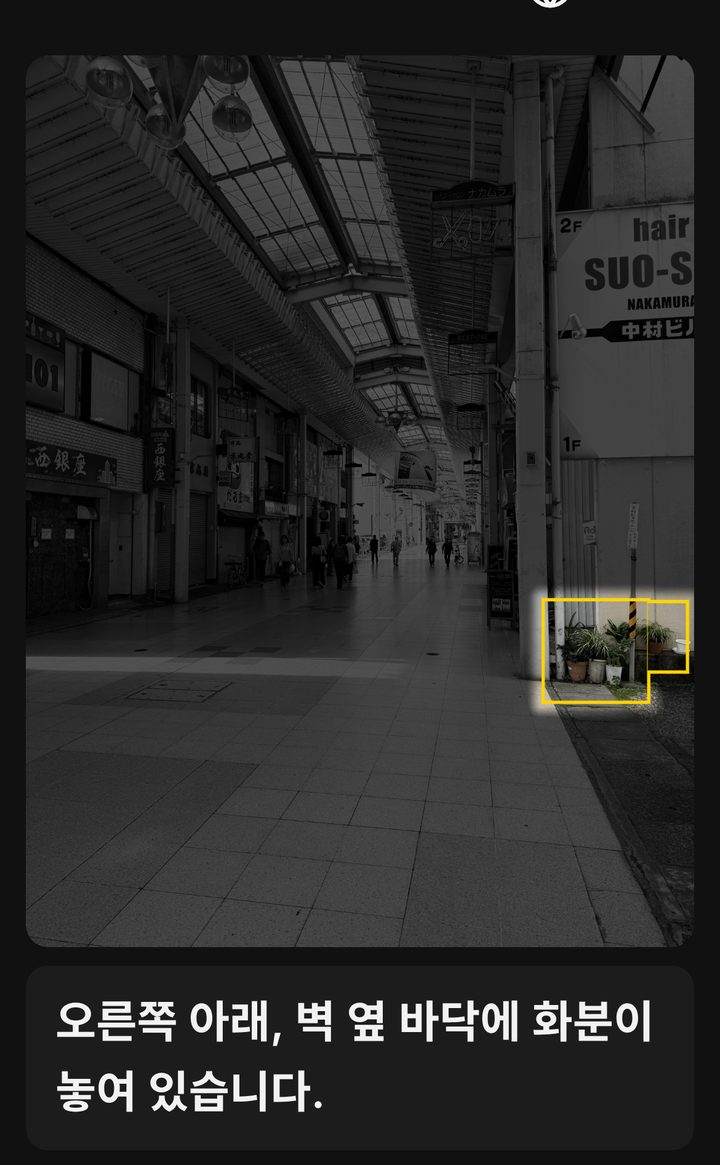
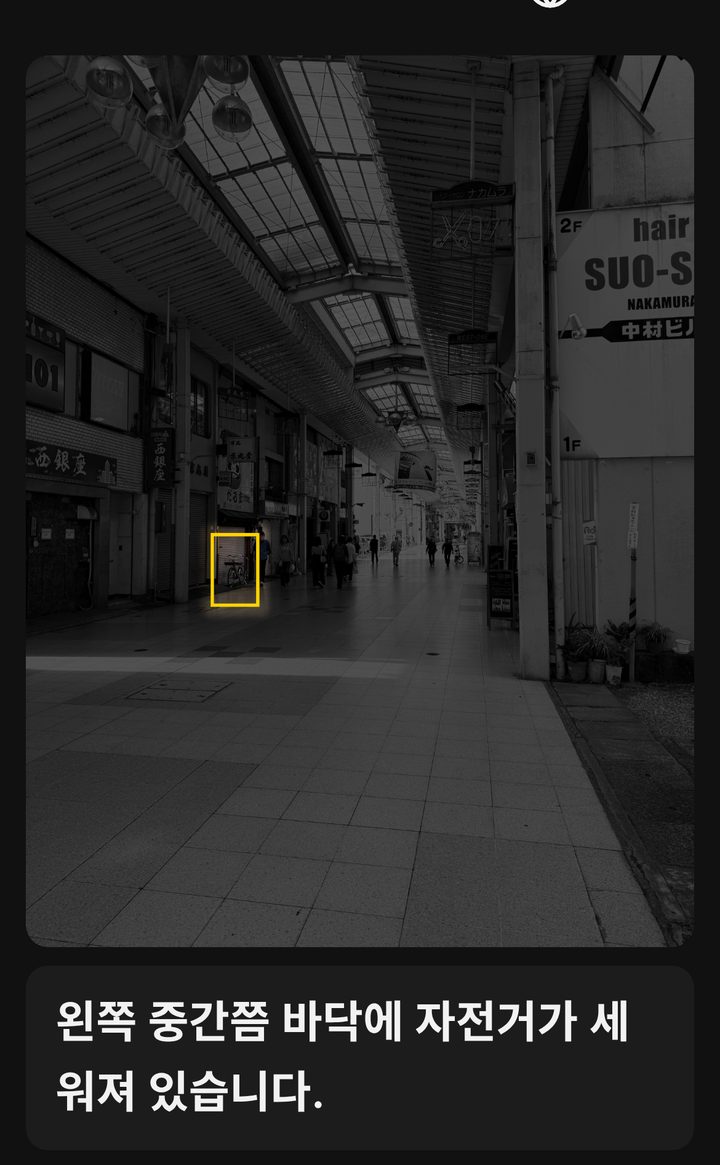
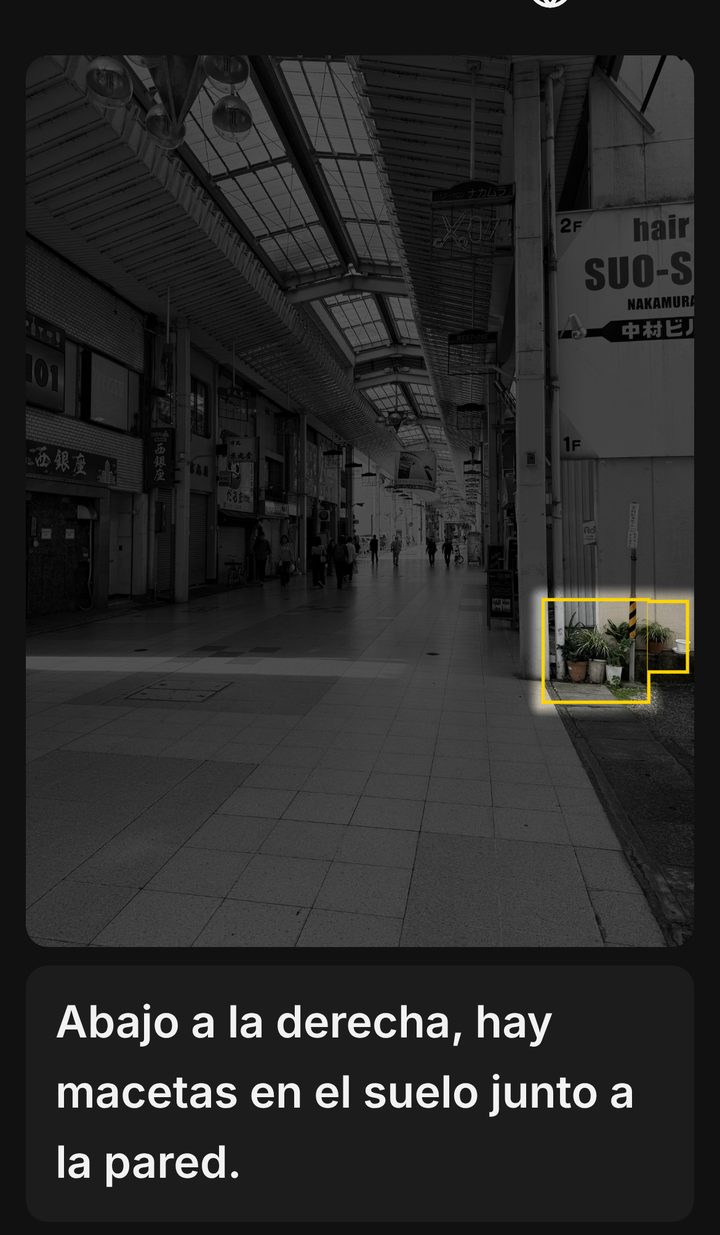
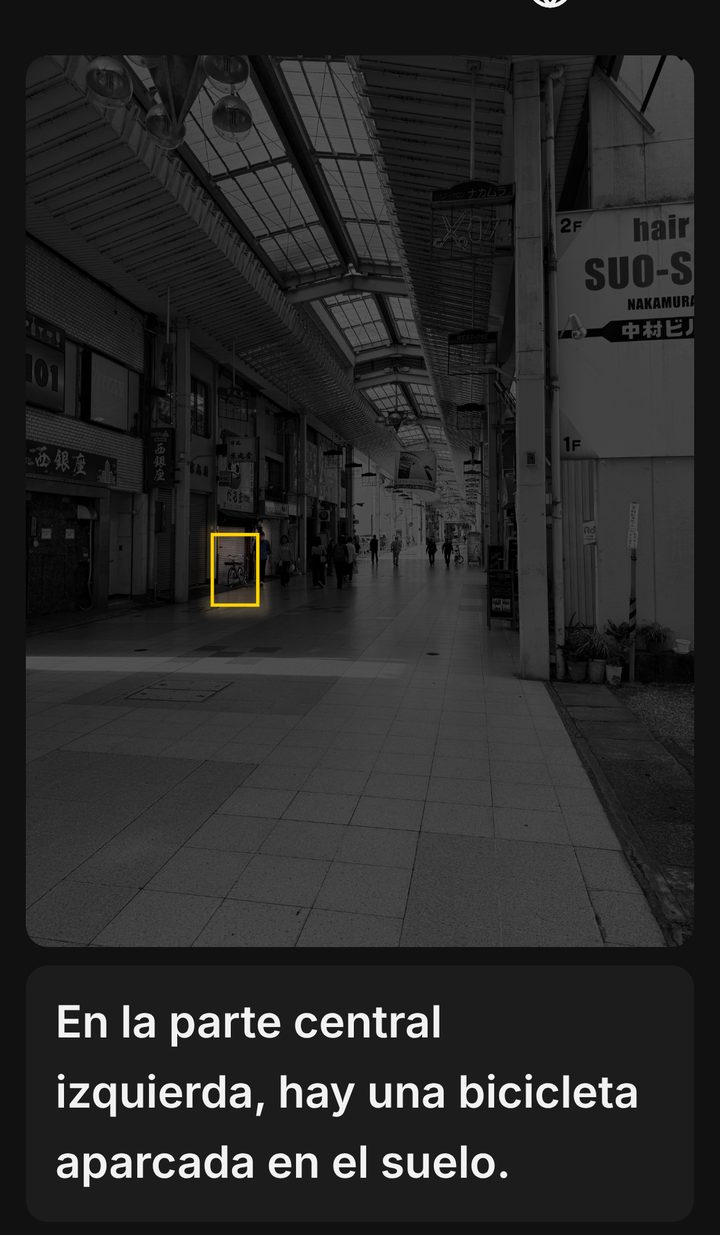
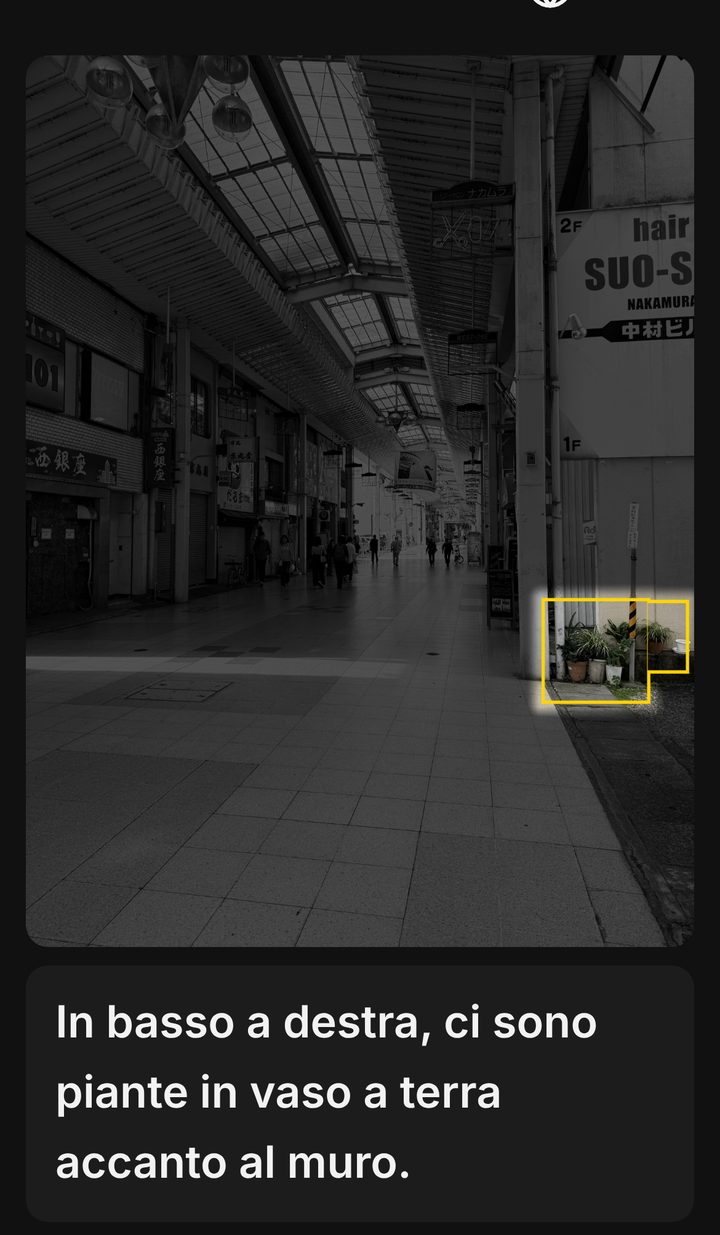
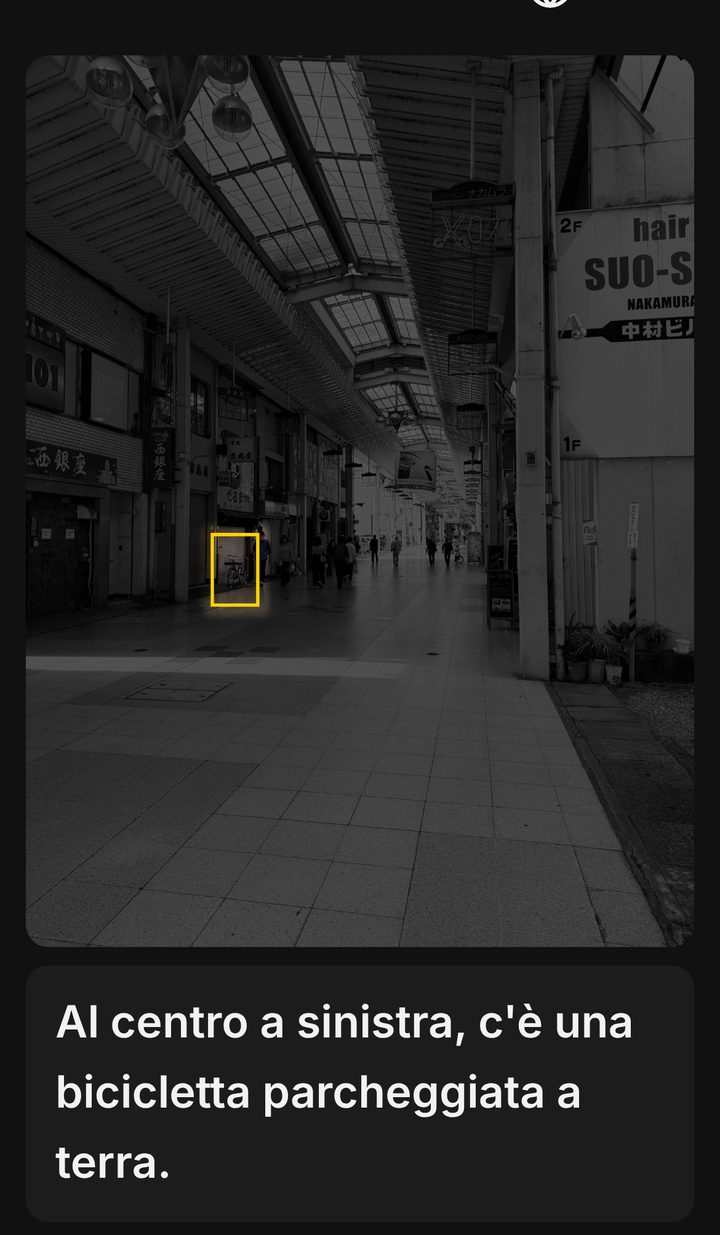
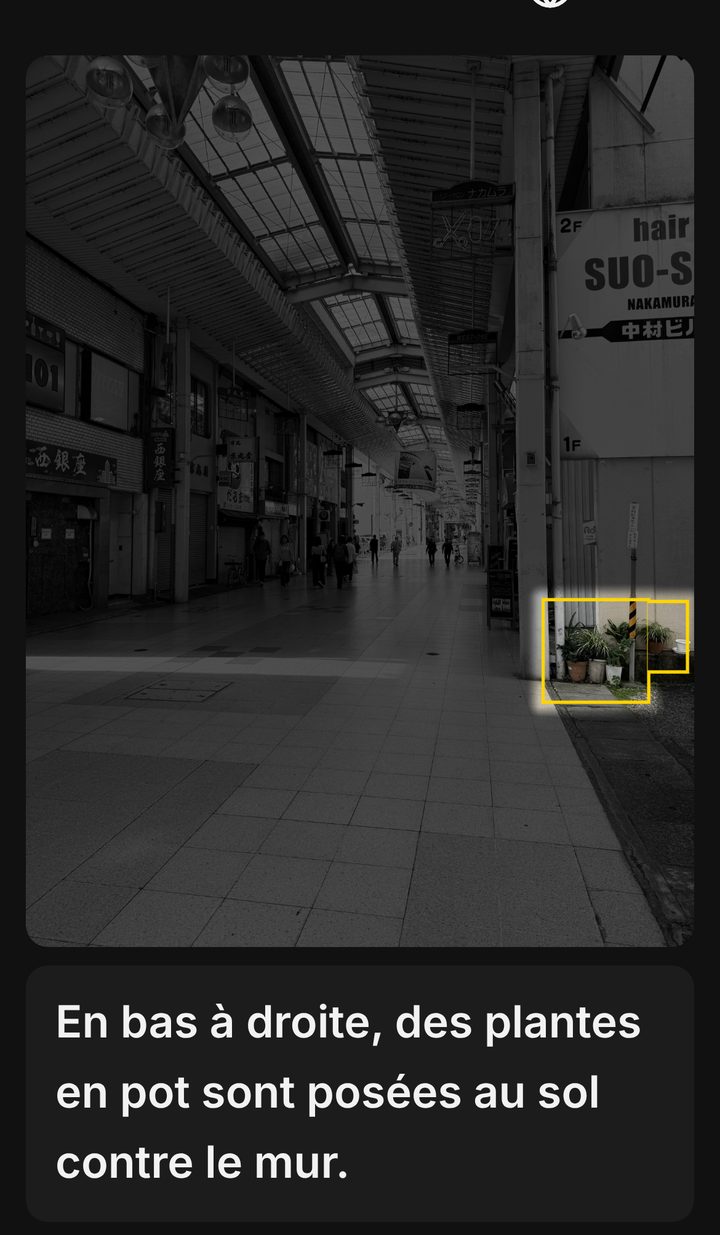
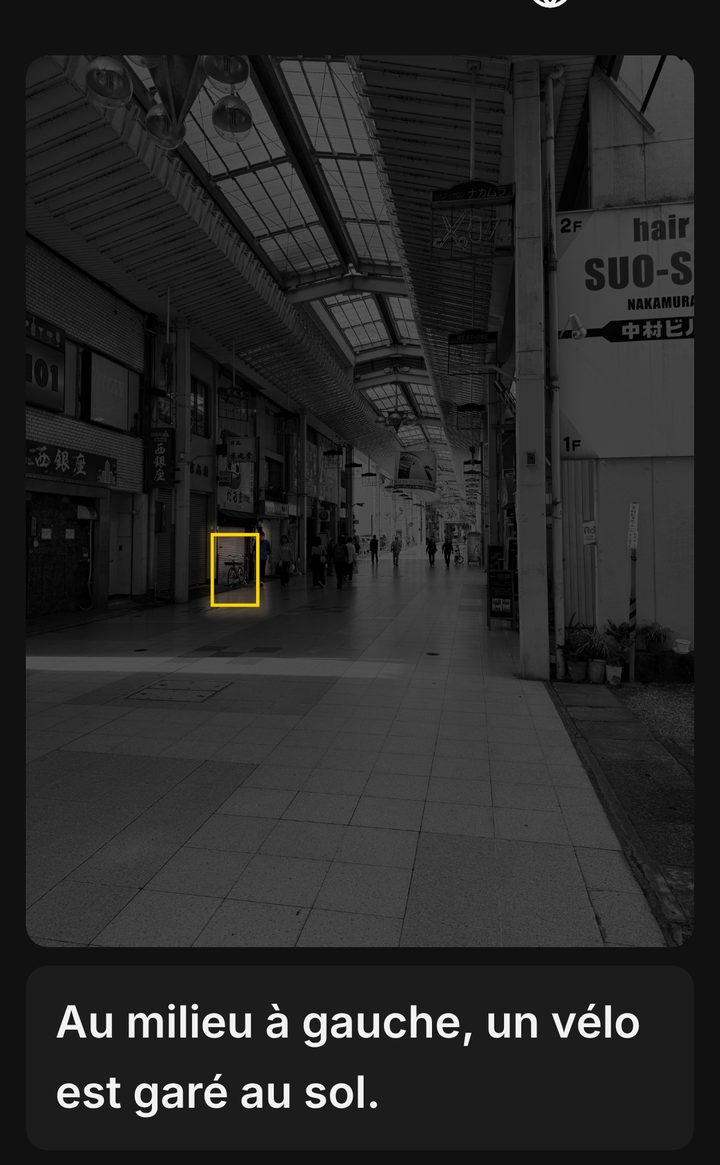
Scene Highlight describes a photo out loud and lights up only the spot it is talking about. You hear what is there and see where it is, at the same time.
1. The original photo
2. With Scene Highlight: the spot being described lights up
Potted plants at your feetA small bicycle far down the arcade
Actual results with a sample photo.
Why we built it
People with low vision often still see part of the world, but finding a specific thing is hard. Someone with central vision loss told us that even finding a traffic light is a struggle. When something falls off a desk, it can be hard to find again.
A voice-only description such as "there is a bicycle on the right" does not tell you which shape in front of you is the bicycle. So the app dims everything else and keeps the described spot bright, linking the voice to what you can still see. Outdoors, it focuses on what is at your feet: steps, changes in the ground surface, and how high obstacles are.
Seeing less clearly is not only about visual impairment. Vision changes with age, and some people can see but find it hard to recognize what they see because of how the brain processes images. We hope this app helps anyone who finds it hard to take in their surroundings.
A surprise when you try it
We built it for people with low vision, yet sighted people enjoy it too. We usually notice only what we are looking for. The app points out things in the corners of a scene, such as planters at your feet or a bicycle parked far down the street, and you rediscover the place you thought you knew. Try one photo of your surroundings.
Practice for dialogue-based art viewing
Have you heard of dialogue-based art viewing? People look at a painting together and describe in words what is shown, where, and how it looks, so that people who cannot see it can enjoy it as well.
The app gives an example of how to put a scene into words: what is there, where it is, and what it looks like. Describe a picture yourself first, then compare with the app's description to notice what you missed or how you could say it differently.
In museums and other places where photography is restricted, please ask the staff for permission before using the app.
How to use it
Tap "Photo" and take or choose a picture.
When the analysis is done, the description starts by voice, lighting up each spot in turn.
Tap a line in the phrase list to hear it again, or ask your own question about the photo.
Please note
Descriptions are made by AI and may contain mistakes or miss things. When walking, always use them together with your usual ways of checking, such as a white cane, a guide dog, and the sounds around you.
장면 해설 하이라이트는 사진에 찍힌 것을 AI가 소리로 해설하고, 지금 말하고 있는 곳만 밝게 비추는 앱입니다. “무엇이 있는지”와 “그것이 어디인지”를 소리와 빛으로 동시에 전합니다.
1. 원래 사진
2. 장면 해설 하이라이트로 보면: 해설하는 곳이 밝아진다
발밑의 화분멀리 작게 보이는 자전거
샘플 사진으로 얻은 실제 결과입니다(영어 해설을 한국어로 옮겨 표시했습니다).
왜 만들었나요
저시력(약시)인 사람은 어느 정도 보이더라도 특정한 물건을 찾기가 어려울 때가 있습니다. 중심 시야가 결손된 분에게서 신호등을 찾는 것조차 힘들다는 이야기를 들었습니다. 책상에서 물건을 떨어뜨렸을 때도 좀처럼 찾지 못합니다.
“오른쪽에 자전거가 있습니다”라고 소리로만 설명해서는 눈앞의 어느 것이 그 자전거인지 알기 어렵습니다. 그래서 설명하는 곳만 밝게 남기고 주변을 어둡게 했습니다. 소리와 빛이 같은 곳을 가리키므로 남아 있는 시력으로 “이것이구나” 하고 연결할 수 있습니다. 야외에서는 발밑의 턱, 바닥 재질의 변화, 장애물의 높이를 중점적으로 전합니다.
보기 어려움은 시각장애만의 문제가 아닙니다. 나이가 들면 주변이 잘 보이지 않게 되고, 눈은 보이지만 뇌 기능의 장애로 인식이 어려운 사람도 있습니다. 주변 상황을 파악하기 어려운 모든 분께 도움이 되기를 바랍니다.
써 보면 알게 되는 뜻밖의 발견
시각장애가 있는 분을 위해 만들었지만, 잘 보이는 사람에게도 즐거운 앱입니다. 사람은 평소 보고 싶은 것만 봅니다. 발밑의 화분이나 멀리 세워진 자전거처럼 찍혀 있지만 놓치기 쉬운 물건을 AI가 알려 주어, 잘 안다고 생각한 장소를 새롭게 발견하게 됩니다. 주변 사진을 한 장 시험해 보세요.
대화형 미술 감상 연습에도
그림을 말로 해설하는 대화형 미술 감상을 아시나요? 작품을 본 사람들이 무엇이 어디에 어떤 모습으로 그려져 있는지를 말로 서로 전하며, 보이지 않는 사람도 함께 작품을 즐기는 감상 방법입니다.
이 앱은 “무엇이, 어디에, 어떤 모습으로”를 말로 옮길 때의 순서와 위치를 전하는 방법의 본보기가 됩니다. 먼저 스스로 해설한 뒤 앱의 해설과 비교하면 놓친 부분이나 표현의 차이를 알아차릴 수 있습니다.
미술관 등 촬영이 제한된 구역이나 대상에서는 시설 직원의 허가를 받은 후 사용해 주세요.
사용 방법
“사진”을 눌러 사진을 찍거나 고릅니다.
분석이 끝나면 자동으로 읽어 주기와 빛으로 강조하기가 시작됩니다.
“문장 목록”에서 다시 듣고 싶은 곳을 누릅니다. 사진에 대해 자유롭게 질문할 수도 있습니다.
중요한 부탁
해설은 AI가 만든 참고 정보이며, 틀리거나 빠뜨린 부분이 있을 수 있습니다. 걸을 때는 흰지팡이, 안내견, 주변 소리 등 평소의 확인 방법과 반드시 함께 사용해 주세요.
Scene Highlight describe una foto en voz alta e ilumina solo el lugar del que está hablando. Escuchas qué hay y ves dónde está, al mismo tiempo.
1. La foto original
2. Con Scene Highlight: se ilumina el lugar que se describe
Macetas a tus piesUna pequeña bicicleta al fondo
Resultados reales con una foto de muestra (la descripción en inglés se muestra traducida).
Por qué la creamos
Las personas con baja visión a menudo todavía ven parte del mundo, pero encontrar algo concreto es difícil. Una persona con pérdida de visión central nos contó que incluso encontrar un semáforo le cuesta. Cuando algo se cae de la mesa, puede ser difícil volver a encontrarlo.
Una descripción solo por voz, como "hay una bicicleta a la derecha", no te dice cuál de las formas que tienes delante es la bicicleta. Por eso la app oscurece todo lo demás y mantiene iluminado el lugar descrito, uniendo la voz con lo que todavía puedes ver. En exteriores se centra en lo que hay a tus pies: escalones, cambios en el tipo de suelo y la altura de los obstáculos.
Ver con menos claridad no es solo cosa de la discapacidad visual. La vista cambia con la edad, y algunas personas ven pero les cuesta reconocer lo que ven por cómo el cerebro procesa las imágenes. Esperamos que esta app ayude a cualquiera a quien le cueste captar su entorno.
Una sorpresa al probarla
La creamos para personas con baja visión, pero quienes ven bien también la disfrutan. Normalmente solo nos fijamos en lo que buscamos. La app señala cosas en los rincones de una escena, como las macetas a tus pies o una bicicleta aparcada al fondo de la calle, y redescubres un lugar que creías conocer. Prueba con una foto de tu alrededor.
Práctica para la apreciación del arte mediante el diálogo
¿Conoces la apreciación del arte mediante el diálogo? Varias personas miran juntas un cuadro y describen con palabras qué aparece, dónde y cómo es, para que quienes no pueden verlo también lo disfruten.
La app ofrece un ejemplo de cómo poner una escena en palabras: qué hay, dónde está y cómo es. Describe primero tú una imagen y compárala después con la descripción de la app para notar lo que se te escapó o cómo podrías decirlo de otra manera.
En museos y otros lugares donde la fotografía está restringida, pide permiso al personal antes de usar la app.
Cómo usarla
Toca "Foto" y toma o elige una imagen.
Al terminar el análisis, la descripción empieza en voz alta e ilumina cada lugar por turnos.
Toca una línea de la lista de frases para volver a escucharla, o haz tu propia pregunta sobre la foto.
Ten en cuenta
Las descripciones las crea una IA y pueden contener errores u omisiones. Al caminar, úsalas siempre junto con tus formas habituales de comprobar, como el bastón blanco, el perro guía y los sonidos del entorno.
Scene Highlight descrive una foto ad alta voce e illumina solo il punto di cui sta parlando. Senti cosa c'è e vedi dove si trova, nello stesso momento.
1. La foto originale
2. Con Scene Highlight: si illumina il punto descritto
Vasi di piante ai tuoi piediUna piccola bicicletta in lontananza
Risultati reali con una foto campione (la descrizione in inglese è mostrata tradotta).
Perché l'abbiamo creata
Le persone ipovedenti spesso vedono ancora una parte del mondo, ma trovare una cosa precisa è difficile. Una persona con perdita della visione centrale ci ha raccontato che persino trovare un semaforo è faticoso. Quando qualcosa cade dal tavolo, può essere difficile ritrovarlo.
Una descrizione solo a voce, come "c'è una bicicletta a destra", non ti dice quale delle forme davanti a te sia la bicicletta. Per questo l'app scurisce tutto il resto e lascia illuminato il punto descritto, collegando la voce a ciò che riesci ancora a vedere. All'aperto si concentra su ciò che è ai tuoi piedi: gradini, cambi di pavimentazione e altezza degli ostacoli.
Vedere meno chiaramente non riguarda solo la disabilità visiva. La vista cambia con l'età, e alcune persone vedono ma faticano a riconoscere ciò che vedono per il modo in cui il cervello elabora le immagini. Speriamo che questa app aiuti chiunque faccia fatica a cogliere ciò che lo circonda.
Una sorpresa quando la provi
L'abbiamo creata per le persone ipovedenti, ma anche chi vede bene la trova divertente. Di solito notiamo solo ciò che cerchiamo. L'app indica cose negli angoli di una scena, come i vasi ai tuoi piedi o una bicicletta parcheggiata in fondo alla strada, e riscopri un luogo che pensavi di conoscere. Prova con una foto di ciò che ti circonda.
Esercizio per la visione dell'arte basata sul dialogo
Conosci la visione dell'arte basata sul dialogo? Alcune persone guardano insieme un dipinto e descrivono a parole cosa vi è raffigurato, dove e come appare, così che anche chi non può vederlo possa apprezzarlo.
L'app offre un esempio di come mettere in parole una scena: cosa c'è, dove si trova e com'è. Descrivi prima tu un'immagine, poi confrontala con la descrizione dell'app per notare cosa ti è sfuggito o come potresti dirlo in modo diverso.
Nei musei e negli altri luoghi in cui le foto sono limitate, chiedi il permesso al personale prima di usare l'app.
Come si usa
Tocca "Foto" e scatta o scegli un’immagine.
Al termine dell'analisi, la descrizione parte a voce e illumina ogni punto a turno.
Tocca una riga dell'elenco delle frasi per riascoltarla, oppure fai una tua domanda sulla foto.
Nota importante
Le descrizioni sono create dall'IA e possono contenere errori od omissioni. Quando cammini, usale sempre insieme ai tuoi controlli abituali, come il bastone bianco, il cane guida e i suoni intorno a te.
Scene Highlight décrit une photo à voix haute et n'éclaire que l'endroit dont elle parle. Vous entendez ce qu'il y a et voyez où c'est, en même temps.
1. La photo d’origine
2. Avec Scene Highlight : l'endroit décrit s'éclaire
Des pots de plantes à vos piedsUn petit vélo au loin
Résultats réels avec une photo d'échantillon (la description en anglais est affichée traduite).
Pourquoi nous l'avons créée
Les personnes malvoyantes voient souvent encore une partie du monde, mais trouver une chose précise est difficile. Une personne atteinte d'une perte de la vision centrale nous a confié que même trouver un feu de circulation est un effort. Quand un objet tombe d'une table, il peut être difficile de le retrouver.
Une description uniquement vocale, comme « il y a un vélo à droite », ne vous dit pas laquelle des formes devant vous est le vélo. L'app assombrit donc tout le reste et garde l'endroit décrit lumineux, reliant la voix à ce que vous pouvez encore voir. En extérieur, elle se concentre sur ce qui est à vos pieds : marches, changements de revêtement et hauteur des obstacles.
Moins bien voir ne concerne pas que le handicap visuel. La vue change avec l'âge, et certaines personnes voient mais ont du mal à reconnaître ce qu'elles voient en raison de la façon dont le cerveau traite les images. Nous espérons que cette app aidera toute personne qui a du mal à percevoir son environnement.
Une surprise en l’essayant
Nous l'avons créée pour les personnes malvoyantes, mais les personnes voyantes l'apprécient aussi. D'habitude, nous ne remarquons que ce que nous cherchons. L'app signale des choses dans les coins d'une scène, comme les pots de plantes à vos pieds ou un vélo garé au fond de la rue, et vous redécouvrez un lieu que vous pensiez connaître. Essayez avec une photo de votre environnement.
Un entraînement à l'observation d'œuvres par le dialogue
Connaissez-vous l'observation d'œuvres d'art par le dialogue ? Des personnes regardent ensemble un tableau et décrivent avec des mots ce qui est représenté, où et comment, afin que celles qui ne peuvent pas le voir puissent aussi l'apprécier.
L'app donne un exemple de la façon de mettre une scène en mots : ce qu'il y a, où c'est et à quoi cela ressemble. Décrivez d'abord vous-même une image, puis comparez avec la description de l'app pour repérer ce qui vous a échappé ou une autre façon de le dire.
Dans les musées et autres lieux où la photographie est limitée, demandez l'autorisation au personnel avant d'utiliser l'app.
Comment l’utiliser
Touchez « Photo » et prenez ou choisissez une image.
Une fois l'analyse terminée, la description démarre à voix haute et éclaire chaque endroit à tour de rôle.
Touchez une ligne de la liste des phrases pour la réécouter, ou posez votre propre question sur la photo.
À noter
Les descriptions sont créées par une IA et peuvent comporter des erreurs ou des oublis. En marchant, utilisez-les toujours avec vos moyens de vérification habituels, comme la canne blanche, le chien guide et les sons qui vous entourent.